On-Page SEO Optimization: A Complete Walkthrough
Moz's list of on-page ranking factors includes title tags, meta descriptions, on-page content, internal links, URL structure, header markup, and alt text. Seven factors. Each one has dozens of guides written about it, most of them saying the same things in slightly different order.
On-Page SEO Optimization: A Complete Walkthrough
Moz's list of on-page ranking factors includes title tags, meta descriptions, on-page content, internal links, URL structure, header markup, and alt text. Seven factors. Each one has dozens of guides written about it, most of them saying the same things in slightly different order. The problem with on-page SEO advice isn't scarcity. It's that practitioners treat every factor with equal weight, spend hours tweaking things that don't matter, and skip the two or three changes that would actually shift their rankings. These seven rules are the ones I'd hand to someone who wanted to stop reading about on-page SEO and start doing it well. They're ordered by impact, not by how often they appear in checklists.
Write your title tag like a headline, not a keyword dump
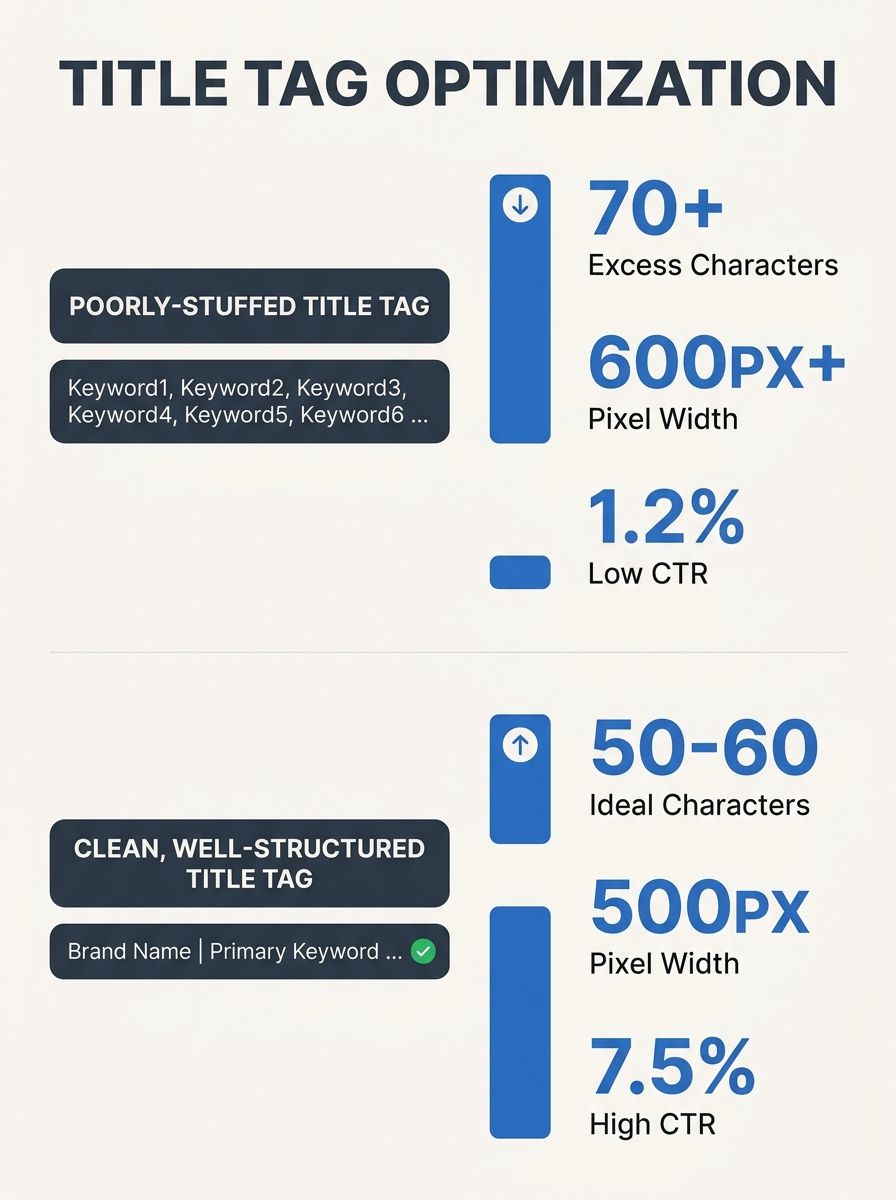
Your title tags appear in search results, in browser tabs, and in social shares. They are the single most-read piece of text on your entire page, and most people write them like they're filling out a form. According to SE Ranking's best-practices research, you should keep titles under 55–60 characters and place the main keyword near the beginning of the tag. That's the mechanical part. The harder part is making the title worth clicking.
A good title tag does three things at once: it tells Google what the page is about, it tells a human why this result is better than the nine others on the page, and it fits in the pixel width Google allocates (roughly 580 pixels on desktop). Stuffing three keywords into 60 characters kills readability. Stick to one primary keyword and, if there's room, one modifier that signals depth or freshness. "On-Page SEO Checklist for Beginners" beats "On-Page SEO Optimization Guide Checklist Tips Best Practices" every time.
When you're doing keyword research to identify what people actually search for, pay attention to how the top-ranking pages phrase their titles. If every competitor uses the word "guide," that's a signal about user expectations. If they all use the current year, consider whether your content is genuinely time-sensitive or whether you're just copying a pattern.
Treat meta descriptions as ad copy, not summaries
Meta descriptions don't directly affect rankings. Google has said this repeatedly. But they affect click-through rate, and CTR affects whether people ever see your content at all. A compelling meta description is a 150–160 character advertisement for your page, written for a person who's scanning ten blue links and deciding which one to trust.
The most common mistake is leaving meta descriptions blank and letting Google auto-generate them from page content. Google's auto-generated snippets are often incoherent sentence fragments pulled from the middle of a paragraph. You can do better. Write a description that states the specific benefit of clicking, includes the primary keyword naturally, and avoids vague promises. "Learn the 7 on-page SEO factors that actually move rankings, with specific character counts, heading rules, and audit steps" is more useful than "Everything you need to know about on-page SEO."
Use one H1, then let hierarchy do the work
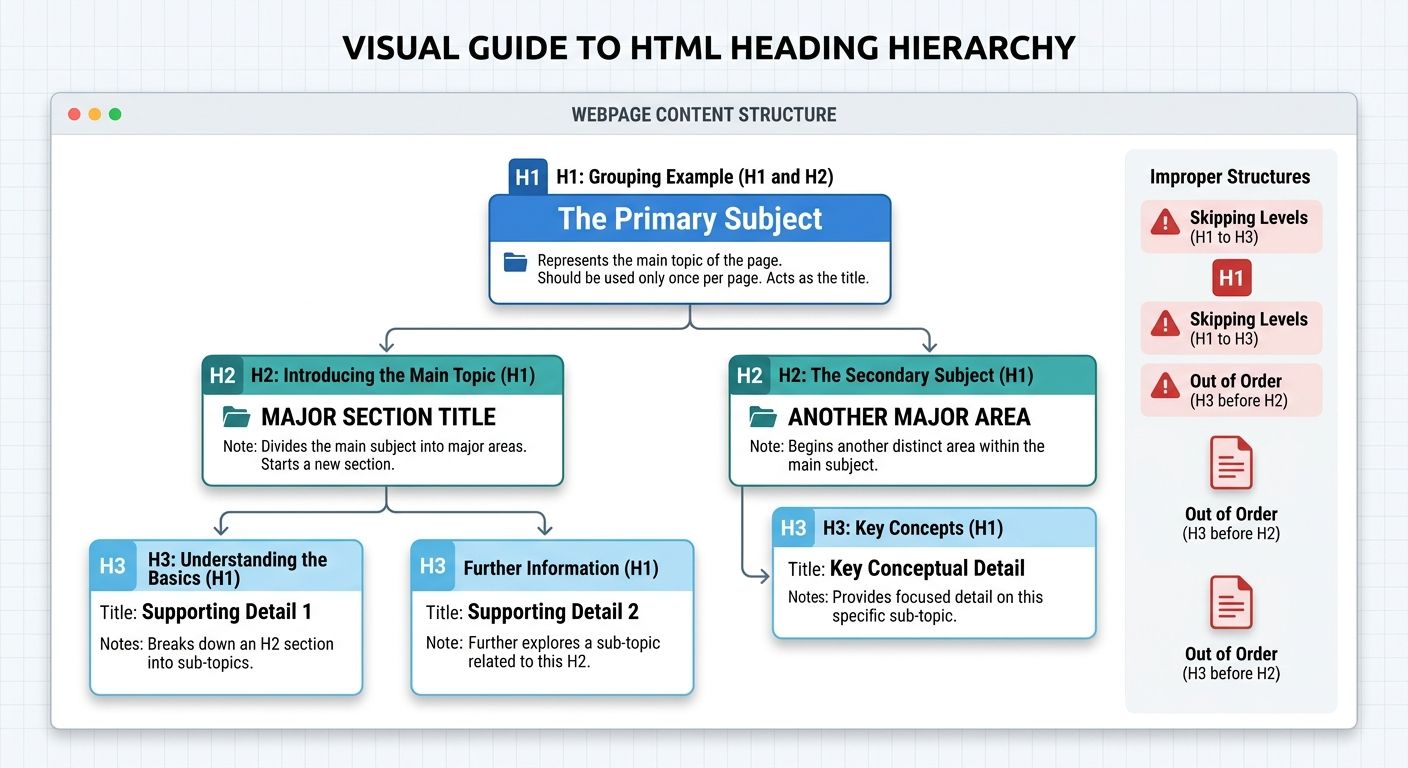
Headings serve two audiences: readers scanning the page for the section they care about, and search engines trying to understand how your content is structured. The rule is simple. Use one H1 for the main topic of the page. Use H2s for major sections. Use H3s for subsections within those H2s. As Yoast's heading guide puts it, one clear H1 for the main topic with H2s for main sections and H3s for sub-sections creates a logical hierarchy that helps both users and crawlers.
Where this goes wrong is when people skip levels (jumping from H1 to H3) or use headings for visual styling instead of semantic structure. If you want bigger bold text, use CSS. If you want to signal that a section is subordinate to the one above it, use the correct heading level. Google may use your H1 in search results as a replacement for your title tag, so treat it with the same care you'd give any other ranking signal.
Before the HTML standard was updated in May 2025, nested <h1> elements inside <section> or <article> tags were supposed to render at reduced sizes automatically. Most browsers never implemented this. The practical takeaway: don't rely on nesting tricks. Use one H1 per page and explicit H2/H3/H4 levels for everything else.
Match the page to the query's intent, not its words
If someone searches "best running shoes," they want a comparison list. If they search "how to tie running shoes," they want instructions. If they search "Nike Pegasus 41 price," they want a product page or a shopping result. The same keyword phrase can carry completely different intent, and no amount of on-page optimization will save a page that answers the wrong question.
Understanding how crawlers, indexers, and ranking algorithms process this is fundamental. If you need a refresher on how search engines determine which pages satisfy which queries, that context makes everything else in this article more concrete. Intent alignment is the precondition for every other on-page SEO factor. A perfectly optimized title tag on a page that mismatches intent will rank nowhere.
Check the current SERP for your target keyword before you write. If the top five results are all listicles, don't publish a 3,000-word essay. If they're all step-by-step tutorials, don't publish a product comparison. Your format, depth, and angle should match what Google has already decided satisfies that query. This is where the concept of organic SEO as a discipline gets practical: you're building pages that earn rankings by actually answering the question.
Audit what's already published before writing anything new
Content decay is real, and updating an existing page almost always produces faster results than publishing a fresh one. Wincher's on-page checklist recommends reviewing and updating older posts with current information and statistics to keep them competitive. Add new sections for recent developments, remove outdated claims, refresh internal links, and resubmit to Google Search Console for a faster re-crawl.
The instinct to create new content is strong, but it often leads to cannibalization. If you have three pages targeting variations of the same keyword, none of them will rank as well as one thorough, well-maintained page would. Before you start drafting, search your own site for the topic. If something already exists, decide whether to update it, merge it with another page, or redirect it. This unglamorous maintenance work is where a lot of on-page SEO gains actually live.
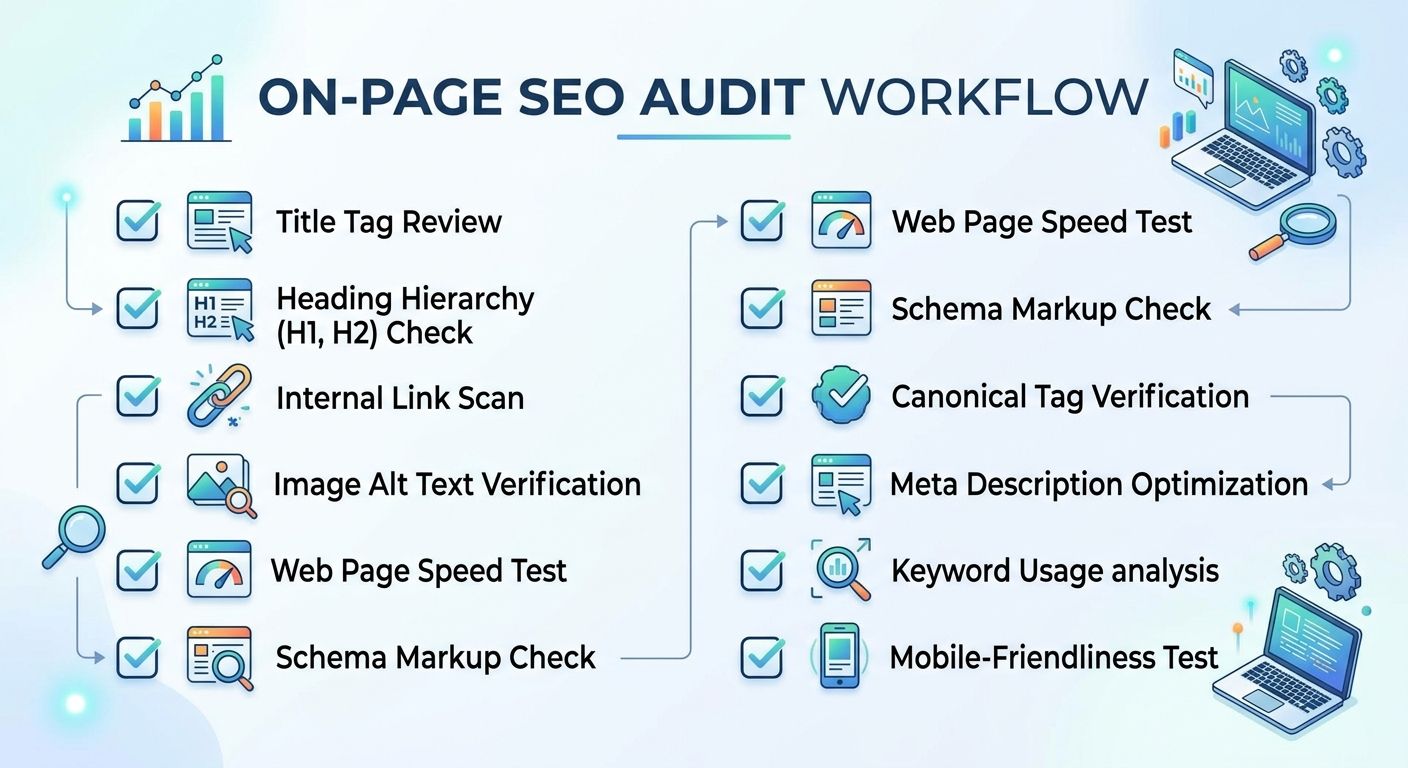
When you audit, check these elements on every page: title tag length and keyword placement, meta description presence and quality, heading hierarchy, image alt text, internal links (both outgoing and incoming), URL structure, and load time. If even two of these are off, you likely have a quick win sitting in your existing content.
Make the page fast enough that nobody notices speed
Page speed matters for rankings. Google confirmed Core Web Vitals as ranking signals, and the thresholds are specific: Largest Contentful Paint under 2.5 seconds, First Input Delay under 100 milliseconds, Cumulative Layout Shift under 0.1. But here's the practical reality: unless your page is genuinely slow (loading in 4+ seconds), speed optimization has diminishing returns compared to content quality and intent matching.
That said, the baseline fixes are worth doing because they affect user experience regardless of ranking impact. Compress images before uploading them (not after). Set explicit width and height attributes on images and embeds to prevent layout shift. Minify CSS and JavaScript. Use a responsive design and test with Google's PageSpeed Insights. Site architecture factors like speed, mobile-friendliness, and URL structures are foundational to on-page SEO because they determine whether your content is even accessible to the people you're trying to reach.
Don't chase a perfect Lighthouse score at the expense of everything else. A page that loads in 1.8 seconds and answers the query brilliantly will outrank a page that loads in 0.9 seconds and says nothing useful. Prioritize accordingly.
Link internally with purpose, not obligation
Internal links distribute authority, help Google discover pages, and guide readers toward related content. The mistake most people make is treating internal linking as an afterthought: tossing in a few links at the end of a draft and calling it done. Effective internal linking is deliberate. Every link should point the reader toward something they'd genuinely want to read next, using descriptive anchor text that tells both the reader and Google what they'll find on the other end.
Avoid generic anchors like "click here" or "read more." Instead, weave links into sentences where the anchor text describes the destination naturally. Build topic clusters around your most important pages: a central pillar page linked to and from multiple supporting articles. This structure signals depth to search engines and keeps readers moving through your site instead of bouncing back to the SERP.
When These Rules Compete
Every on-page SEO rule above will, at some point, conflict with another. Writing a compelling title tag sometimes means the keyword doesn't land in the first three words. Matching search intent perfectly sometimes means your page is shorter than your competitors'. Updating old content sometimes reveals that the entire page needs a rewrite, which takes longer than creating something new.
The resolution is always the same: prioritize what helps the person searching. Search engines are built to reward pages that satisfy queries. If your title tag is clear and honest, your headings create scannable structure, your content answers the question thoroughly, and your page loads without drama, you've handled the on-page factors that actually matter. The rest is refinement, and refinement works best when you measure before you adjust. Check rankings, check click-through rates in Search Console, and check engagement metrics. Then change one thing at a time so you know what moved the needle. On-page SEO is maintenance as much as it is creation, and the people who treat it that way tend to outperform those chasing the next new tactic.
OrganicSEO.org Editorial
Editorial team writing about Ethical, white-hat, organic SEO education.
Frequently Asked Questions
- How long should title tags be for SEO?
- Title tags should be kept under 55-60 characters to fit within Google's pixel width allocation (roughly 580 pixels on desktop). Place your main keyword near the beginning of the tag and stick to one primary keyword with at most one modifier to maintain readability.
- Do meta descriptions affect search rankings?
- Meta descriptions don't directly affect rankings according to Google, but they significantly impact click-through rate, which determines whether people see your content. Write compelling 150-160 character descriptions that state specific benefits and include your primary keyword naturally.
- How many H1 tags should a page have?
- Use one H1 tag per page for the main topic, H2 tags for major sections, and H3 tags for subsections. Don't skip heading levels or use headings purely for visual styling—use CSS for formatting and heading levels only for semantic structure.
- What is search intent and why does it matter for SEO?
- Search intent refers to what a user actually wants when searching a query—for example, "best running shoes" signals they want a comparison list. Intent alignment is the precondition for all other on-page SEO factors; a perfectly optimized page that answers the wrong question won't rank.
- Should I update existing content or create new pages for SEO?
- Updating existing pages almost always produces faster ranking results than publishing new content. Before writing anything new, audit your site for existing content on the topic and update it with current information, new sections, and refreshed internal links to avoid cannibalization.
- How fast should a webpage load for SEO?
- Google's Core Web Vitals thresholds are Largest Contentful Paint under 2.5 seconds, First Input Delay under 100 milliseconds, and Cumulative Layout Shift under 0.1. Unless your page loads in 4+ seconds, speed optimization has diminishing returns compared to content quality and intent matching.
- How should I use internal links for SEO?
- Use internal links deliberately to distribute authority, help Google discover pages, and guide readers to related content. Use descriptive anchor text that naturally describes the destination, build topic clusters around important pillar pages, and periodically crawl your site to find orphan pages with no internal links pointing to them.