Image SEO Optimization: Compression, Alt Text, and Schema
One photographer's Wix homepage was serving a single portrait image at 5,792 × 8,688 pixels, weighing 17.84 MB for that one file, according to testing documented in ForegroundWeb's image sizing analysis. The displayed version on screen was about 900 pixels wide.
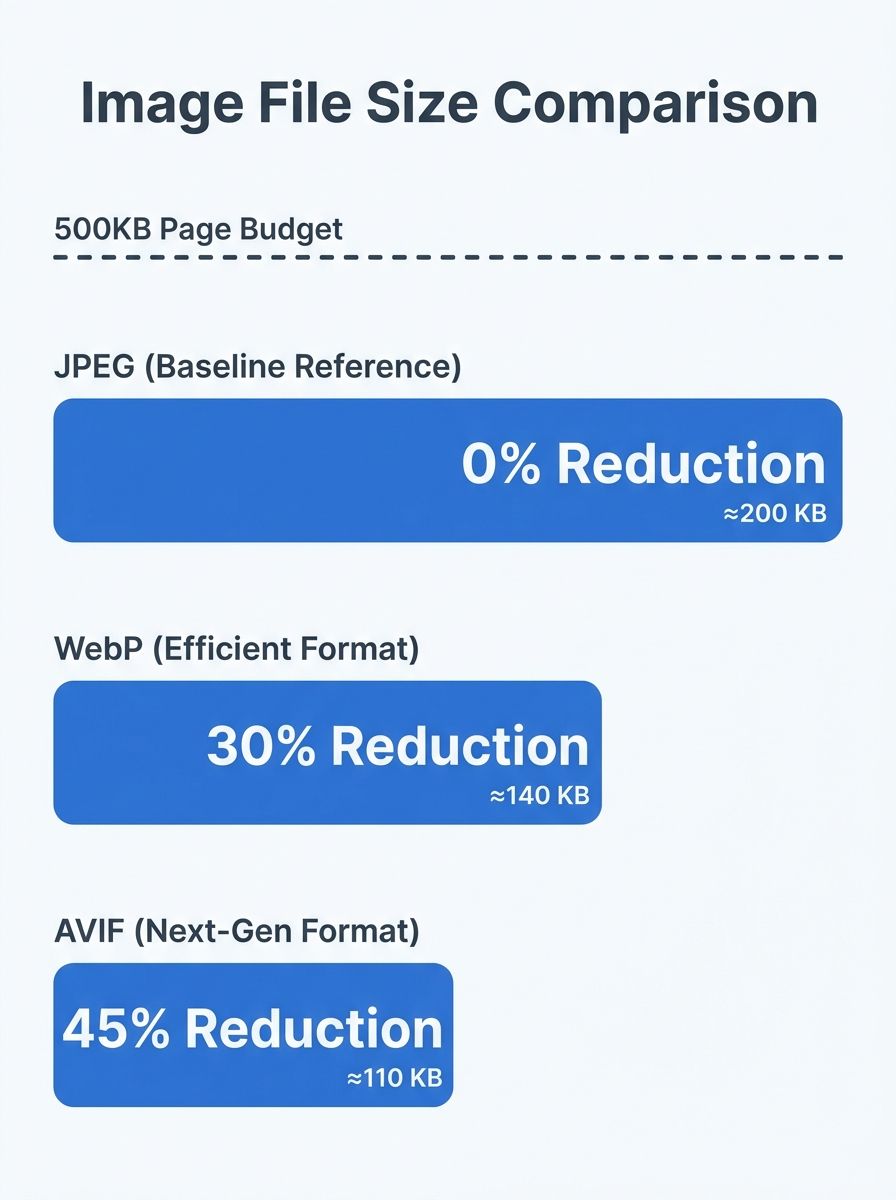
Image SEO Optimization: Compression, Alt Text, and Schema Markup
One photographer's Wix homepage was serving a single portrait image at 5,792 × 8,688 pixels, weighing 17.84 MB for that one file, according to testing documented in ForegroundWeb's image sizing analysis. The displayed version on screen was about 900 pixels wide. The other 4,892 horizontal pixels existed purely to slow the page down. This gap between what gets uploaded and what actually gets displayed defines the image SEO problem for most websites. And the data on how badly sites handle it is worse than you'd expect.
For a fast-loading page, all images combined should ideally total less than 500KB. A single uncompressed photo at 17.84 MB exceeds that budget by a factor of 35. When you understand how search engines evaluate page speed and use it for ranking, as we covered in how crawling, indexing, and ranking actually work, the performance cost of bloated images becomes an SEO cost too.
Google's PageSpeed documentation states it plainly: the fewer bytes the browser has to download, the less competition there is for bandwidth, and the faster the browser can render content on screen. Every kilobyte matters because image weight directly impacts Largest Contentful Paint (LCP), one of the Core Web Vitals that feed into ranking signals.
The Compression Math That Changes Behavior
JPEG has been the default web image format for decades. It still works. But WebP and AVIF were designed specifically for the constraints of modern web delivery, and the compression numbers explain why they're worth the migration effort.
AVIF achieves roughly 50% smaller file sizes than JPEG at equivalent visual quality. WebP lands somewhere between JPEG and AVIF, offering superior compression while maintaining broad browser support. For a site with 40 product images per category page, converting from JPEG to AVIF could cut total image payload from 4MB to under 2MB without any visible quality loss.
The format you choose matters less than the discipline of choosing one at all. Many sites still upload whatever their camera or design tool exports. That default is almost always a full-resolution PNG or uncompressed JPEG that's 3x to 10x larger than necessary.
A practical compression workflow looks like this:
Export at the display dimensions you actually need. If your layout renders an image at 800px wide, don't upload a 3000px source file.
Convert to WebP or AVIF. Tools like Squoosh, ShortPixel, and TinyPNG handle this without requiring design skills.
Use the
srcsetattribute to serve different sizes for different devices. A phone on a 375px viewport shouldn't download the same file as a 27-inch desktop monitor.Add
loading="lazy"to images below the fold. For your hero image or above-the-fold content, usefetchpriority="high"instead to tell the browser what to prioritize.
One detail that often gets skipped: file names. A file called IMG_4782.jpg tells search engines nothing. A file called hand-stitched-leather-oxfords-brown.webp contains keywords that help with image search discovery. This is basic image optimization work that takes ten seconds per file and compounds across an entire site.
Alt Text: The Most Misunderstood Attribute in HTML
The alt attribute on an <img> tag serves two audiences simultaneously: screen readers used by visually impaired visitors, and search engine crawlers that can't "see" your images the way a human does. Moz's guide on alternative text frames it well: alt text improves web accessibility and search engine optimization in a single line of HTML.
Where most sites go wrong is treating alt text as either a keyword-stuffing opportunity or an afterthought. Both approaches waste the attribute's value.
Google's own image SEO best practices documentation recommends writing alt text that's useful, information-rich, and uses keywords appropriately without spamming. Yoast's research confirms that including relevant keywords in alt text improves your chance of ranking in image search.
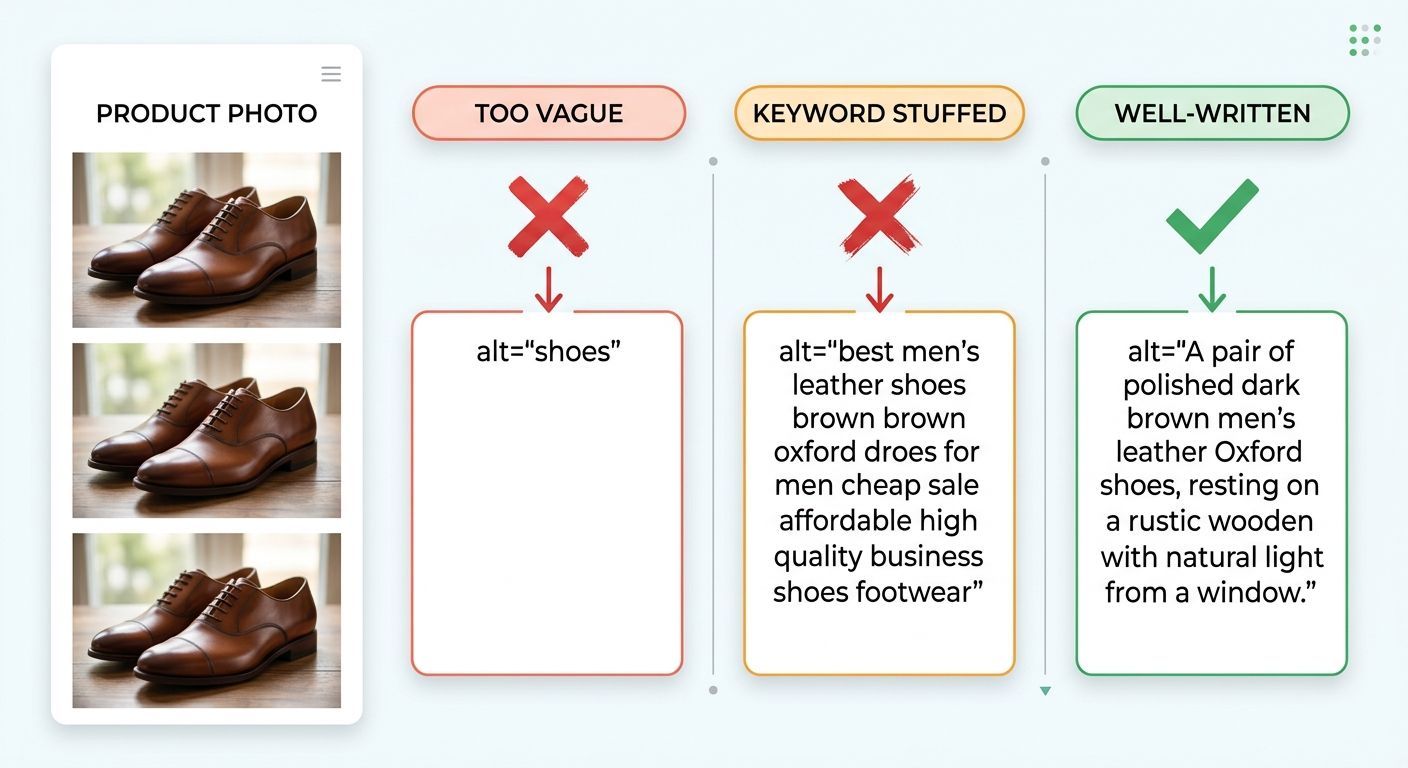
Here's what good and bad alt text looks like in practice:
Bad:
alt="shoes"(too vague, no useful context)Bad:
alt="buy cheap leather shoes men's shoes brown shoes best shoes online"(keyword stuffing, unreadable by screen readers)Good:
alt="Hand-stitched brown leather oxford shoes with Goodyear welt construction"(specific, descriptive, naturally includes relevant terms)
For decorative images like background textures or visual dividers, use an empty alt attribute: alt="". This tells screen readers to skip the image entirely, and it prevents search engines from trying to index a visual element that carries no informational value. If you're working through your full on-page SEO checklist, auditing alt text across your entire site is one of the highest-return tasks you can do in a single afternoon.
Alt Text for Different Content Types
The right alt text depends on the image's purpose on the page:
Product images: Describe the product specifically, including material, color, size, or distinguishing features. Think about what a buyer would search for.
Informational charts or graphs: Summarize the data the chart conveys. "Bar chart showing a 40% decrease in page load time after WebP conversion" beats "chart" by a wide margin.
Screenshots in tutorials: Describe what the screenshot shows in context. "Google Search Console performance report filtered to image search results" tells both screen readers and crawlers exactly what they're dealing with.
Team photos or portraits: Include the person's name and role if known. "Headshot of Jane Doe, lead designer at Acme Corp" is useful. "Photo of woman" is not.
When you're targeting specific search queries, your alt text strategy should align with the terms real people actually type into Google Images. A user searching for "minimalist oak standing desk" wants to find an image described that way, not one tagged as "desk product photo 01."
Schema Markup: Telling Search Engines What Your Images Represent
Compression makes your images fast. Alt text makes them findable. Schema markup makes them eligible for enhanced search features that standard images can't access.
The Schema.org ImageObject type provides a structured way to describe an image's author, content location, date published, description, and licensing information. When implemented as JSON-LD, it gives Google a machine-readable layer of data about your visual content that goes beyond what alt text and file names can communicate.
A basic ImageObject in JSON-LD looks like this:
{
  "@context": "https://schema.org",
  "@type": "ImageObject",
  "contentUrl": "https://example.com/images/oak-standing-desk.webp",
  "description": "Minimalist oak standing desk with adjustable height mechanism, shown in a home office setting",
  "name": "Oak Standing Desk - Home Office",
  "author": {
    "@type": "Person",
    "name": "Jane Doe"
  },
  "datePublished": "2026-03-15",
  "license": "https://example.com/image-license"
}
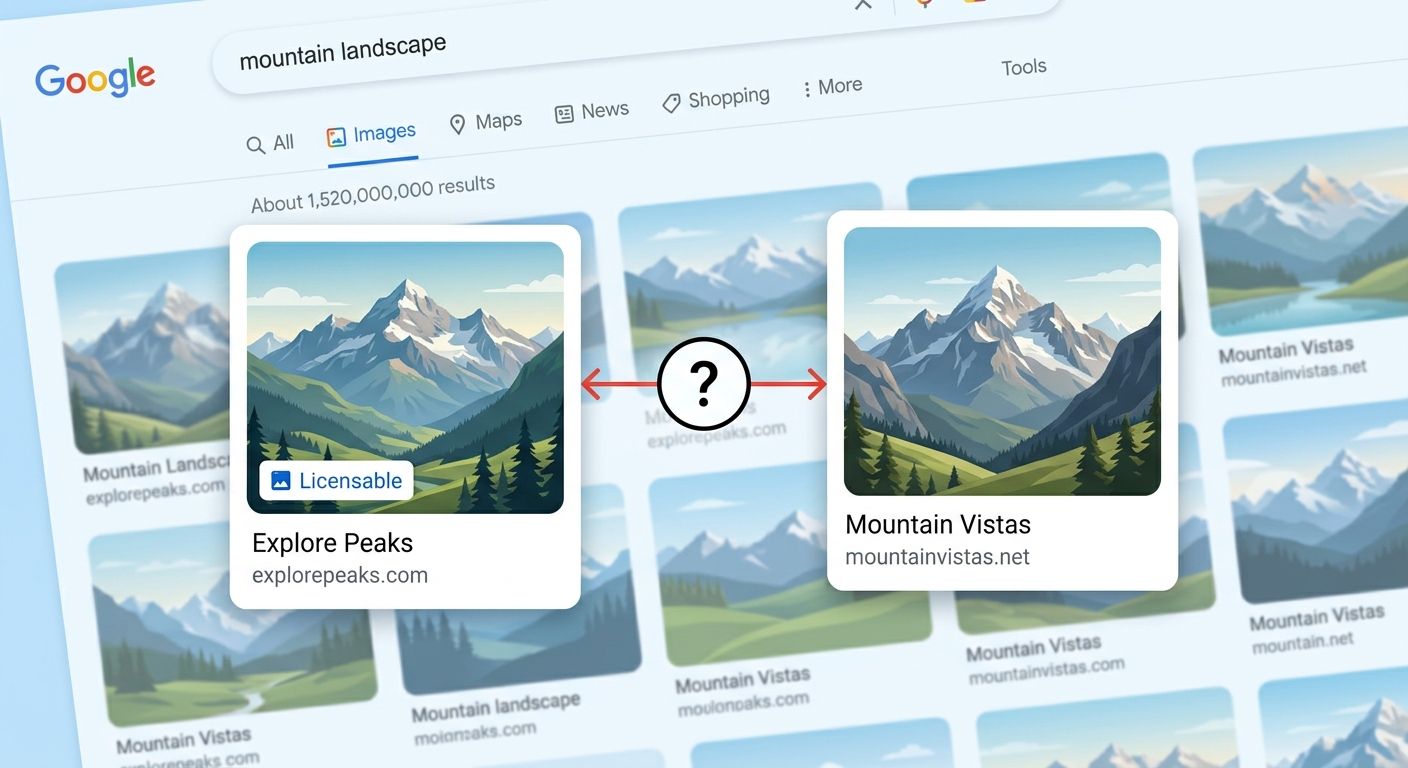
The license property is particularly interesting. When Google detects licensing metadata on an image, it can display a "Licensable" badge in Google Images, signaling to users that the image has a known creator and usage terms. For photographers, agencies, and any site that produces original visual content, this badge increases click-through rates and reinforces the site's credibility as an original content source.
You don't need ImageObject markup on every image across your site. Focus schema implementation on:
Product images that should appear in product-rich results
Recipe images where structured data triggers recipe cards in search
Original photography or illustrations where licensing information adds value
Article featured images on pages already using
ArticleorBlogPostingschema
For pages that already use structured data at the page level, adding the image property (which accepts either a URL or a full ImageObject) to your existing schema is the simplest path. The Schema.org image property documentation shows that any Thing type can include an image reference, so you can attach image data to products, organizations, events, or articles without creating standalone ImageObject blocks.
Where These Three Layers Compound
Compression, alt text, and schema aren't independent tactics. They compound. A well-compressed WebP image with accurate alt text and ImageObject schema loads fast, gets indexed accurately, and qualifies for rich results. Remove any one layer and you lose a specific advantage: speed, discoverability, or enhanced SERP features.
The sites that perform best in image search tend to treat images with the same rigor they apply to written content. Every image gets a descriptive file name, appropriate dimensions, a modern format, alt text written for its specific context, and structured data where it qualifies for enhanced results.
Questions the Numbers Still Can't Answer
The data on image compression, alt text effectiveness, and schema-driven rich results is strong enough to guide practice. But several gaps remain.
We know AVIF compresses better than WebP on photographic content. We don't have clear benchmarks for illustration-heavy sites, icon-dense interfaces, or pages where dozens of small UI images create a different performance profile than a few large hero photos. The 500KB page budget for images is a useful rule of thumb, but it doesn't account for the growing prevalence of above-the-fold video thumbnails, animated product previews, or interactive media that blur the line between "image" and "content."
On alt text, correlation data between keyword presence and image search rankings exists, but isolating alt text's contribution from surrounding page content, domain authority, and backlink signals is genuinely difficult. The best we can say with confidence is that descriptive, relevant alt text consistently outperforms absent or generic alt text. The precise weight Google assigns to it remains opaque, and anyone claiming exact percentages is extrapolating beyond what the data supports.
Schema markup's impact on click-through rates in image search is promising but still under-documented across industries. The "Licensable" badge clearly benefits photographers and stock image providers. Whether ImageObject markup materially helps an e-commerce site's product images appear more often in visual search results, holding all other variables constant, remains an open question that deserves better controlled studies. The best approach right now is to implement all three layers where they make sense for your content, measure the results in Google Search Console's image search performance report, and let your own data fill the gaps that industry benchmarks haven't yet covered.
OrganicSEO.org Editorial
Editorial team writing about Ethical, white-hat, organic SEO education.
Frequently Asked Questions
- What is the ideal total file size for all images on a web page?
- All images combined should ideally total less than 500KB for a fast-loading page. Image weight directly impacts Largest Contentful Paint (LCP), one of the Core Web Vitals that feed into ranking signals.
- How much smaller is AVIF compared to JPEG?
- AVIF achieves roughly 50% smaller file sizes than JPEG at equivalent visual quality. For a site with 40 product images per category page, converting from JPEG to AVIF could cut total image payload from 4MB to under 2MB without any visible quality loss.
- What should I write for alt text on product images?
- Describe the product specifically, including material, color, size, or distinguishing features. Good alt text should be specific and descriptive—for example, 'Hand-stitched brown leather oxford shoes with Goodyear welt construction' rather than vague terms like 'shoes' or keyword-stuffed phrases.
- Should I add alt text to decorative images?
- No, decorative images like background textures or visual dividers should use an empty alt attribute: alt="". This tells screen readers to skip the image entirely and prevents search engines from trying to index visual elements that carry no informational value.
- What image file formats are best for web?
- WebP and AVIF were designed specifically for modern web delivery and offer superior compression compared to JPEG. WebP lands between JPEG and AVIF while maintaining broad browser support, making it a practical choice for most sites.
- How do I use srcset and lazy loading for images?
- Use the srcset attribute to serve different image sizes for different devices, so a phone on a 375px viewport doesn't download the same file as a 27-inch desktop monitor. Add loading="lazy" to images below the fold, and use fetchpriority="high" instead for hero images and above-the-fold content to tell the browser what to prioritize.
- What is Schema markup and what does it do for images?
- Schema markup, specifically the Schema.org ImageObject type, provides a structured way to describe an image's author, content location, date published, description, and licensing information. When implemented as JSON-LD, it gives Google machine-readable data that can qualify images for enhanced search features like a 'Licensable' badge that increases click-through rates.
- Does uploading a WebP file with a .jpg extension cause problems?
- Yes, uploading a WebP file with a .jpg extension can confuse search engines and cause rendering issues. File names should be accurate and use the correct MIME type, as mismatched extensions create hard-to-diagnose problems.