SEO-Friendly URLs: Structure, Hyphens, and Redirects
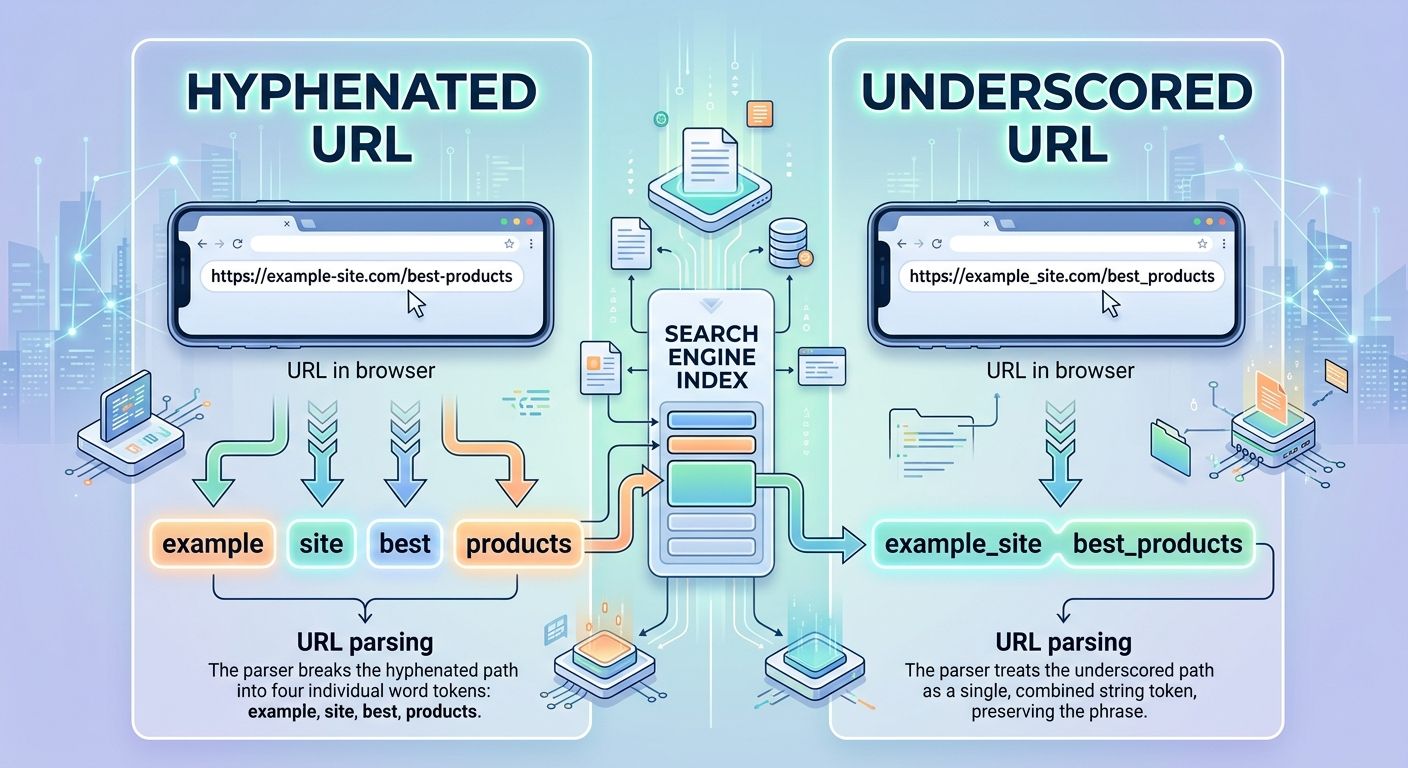
Google's URL parser treats a hyphen as a word separator and an underscore as a joiner. That single parsing rule explains why seo-friendly-urls registers as three distinct keywords while seofriendlyurls reads to the crawler as one opaque string.
SEO-Friendly URLs: How Structure, Hyphens, and Redirects Actually Work
Google's URL parser treats a hyphen as a word separator and an underscore as a joiner. That single parsing rule explains why seo-friendly-urls registers as three distinct keywords while seo_friendly_urls reads to the crawler as one opaque string. It's a small mechanical difference that shapes how your pages get indexed, how link equity flows when you restructure a site, and whether your URLs help or hurt your rankings. The mechanism behind SEO URLs is simpler than most guides make it sound, but the details matter because mistakes here tend to compound silently across hundreds or thousands of pages.
How Search Engines Read a URL
When Googlebot encounters a URL, it doesn't treat the string as a single label. It breaks the URL into components: protocol, domain, path segments (the folders), and the slug. Each component carries a signal.
The path segments tell the crawler about your site's hierarchy. The slug tells it what this specific page is about. Query parameters (?id=123&session=abc) tell it... well, usually nothing useful. According to Google's own URL structure documentation, complex URLs with excessive parameters, session IDs, and calendar-generated paths create indexing problems. The crawler may waste crawl budget on thousands of parameter variants that all serve the same content.
This is the first piece of the mechanism: the URL is a content signal, parsed into parts, each part evaluated independently. If you understand how crawling and indexing work at a fundamental level, URL parsing is a natural extension of that process. The crawler is trying to build a map of your site's content, and the URL is the label on each node in that map.
Folder Depth and Hierarchy
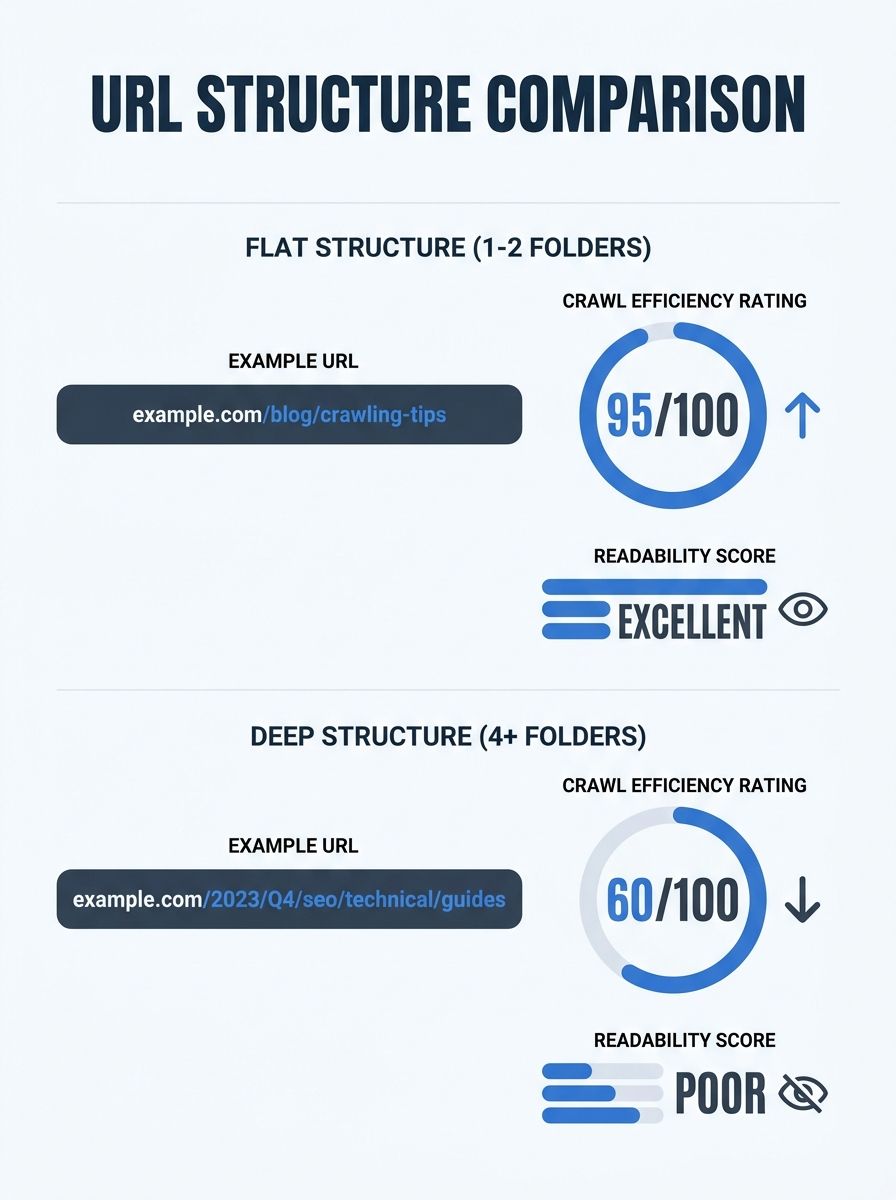
A common question about url structure is how many folder levels to use. The answer depends on site size, but the principle is consistent: flatter is usually better.
According to Straight North's analysis of URL optimization, one or two folder levels work best for most sites. A structure like /blog/seo-friendly-urls/ is preferable to /blog/technical-seo/url-optimization/guide/seo-friendly-urls/. Every additional folder level dilutes the URL's readability and can make the crawler work harder to understand where the page sits in your content hierarchy.
The exception is large e-commerce sites with thousands of products. A store selling clothing legitimately needs /clothing/mens/shirts/ because the category structure mirrors how customers navigate. But even here, three levels is plenty. Going deeper than that rarely helps and creates URLs that look like file system paths from 1998.
The practical rule: each folder level should represent a genuine content category that a human would recognize. If a folder exists only because your CMS generates it, strip it out through url rewriting in your server config or CMS settings.
Slugs and Keywords
The slug is the last segment of the URL path, and it carries the most weight for signaling page-level relevance. Include your primary keyword in the slug, keep it between 3 and 5 words, and separate those words with hyphens.
A slug like /keyword-research-guide/ is clear and direct. A slug like /how-to-do-keyword-research-for-beginners-step-by-step/ is too long and dilutes the keyword signal with filler words. Ahrefs data shows that URLs exceeding 115 characters correlate with lower average rankings. When you're identifying the right search queries to target, think about how those terms will look inside a URL slug. If you can't fit it into 3-5 words, you're probably targeting a phrase that's too broad for a single page.
One detail people overlook: always use lowercase. Mixed-case URLs (/SEO-Guide/ vs /seo-guide/) can create duplicate content issues on case-sensitive servers. Set a site-wide rule and enforce it.
Why Hyphens Win and Underscores Lose
This is one of the few areas in SEO where the answer is genuinely unambiguous. Search Engine Journal's URL structure guide puts it plainly: always use hyphens, not underscores.
The mechanism is straightforward. Google's parser interprets hyphens as spaces between words. When you write seo-friendly-urls, the engine reads "seo," "friendly," and "urls" as three separate tokens. With underscores, seo_friendly_urls gets parsed as a single compound token. The engine may still figure out the individual words through other signals, but you're making it work harder for no benefit.
There's a practical readability issue too. When a URL with underscores gets published as a bare link (in an email, a PDF, a plain-text document), the underline styling of the hyperlink hides the underscores completely. seo_friendly_urls looks like seofriendlyurls to the reader. Hyphens remain visible regardless of styling.
If you're already ranking well with underscores in your URLs, don't rush to change them. SiteGuru's analysis notes that if your current underscore-based URLs are performing fine, the disruption of changing them may outweigh the benefit. But for any new page, any new site, any new URL: hyphens.
Redirects and Link Equity Transfer
URL structure decisions become consequential when you need to change existing URLs. A URL that ranks well has accumulated backlinks, internal links, and authority. Changing it without a redirect destroys all of that equity overnight.
The mechanism here is the 301 redirect, which tells search engines the page has permanently moved to a new address. When you use a 301, Google transfers the authority, ranking power, and backlinks associated with the old URL to the new location. The new URL inherits what the old one built.
A 302 redirect signals a temporary move. It's appropriate when you're running A/B tests, doing site maintenance, or sending users to a seasonal page that will change back. But 302s don't transfer link equity the way 301s do. Moz's redirect guide confirms that permanent redirects are better for SEO whenever the URL change is meant to last.
When Redirects Go Wrong
The two failure modes are predictable:
No redirect at all. You change a URL, the old one returns a 404, and every backlink pointing to it becomes a dead end. The ranking power evaporates.
Redirect chains. Page A redirects to Page B, which redirects to Page C, which redirects to Page D. Each hop in the chain costs you some equity and crawl efficiency. Google will follow up to about 10 redirects before giving up, but you should never need more than one.
After any URL change, update your internal links to point directly to the new URL. Don't rely on the redirect as a permanent crutch for your own site's navigation. Update your XML sitemap. Then monitor Google Search Console for 4 to 8 weeks to catch any indexing issues.
This connects directly to on-page optimization practices, because internal links are one of the biggest equity-passing mechanisms on your site. If your internal links still point to old URLs, you're forcing Google through a redirect on every crawl of those pages, wasting budget and leaking small amounts of equity on every visit.
Canonical Tags and Duplicate URLs
Redirects handle cases where a URL permanently changes. Canonical tags handle a different problem: when the same content exists at multiple URLs simultaneously.
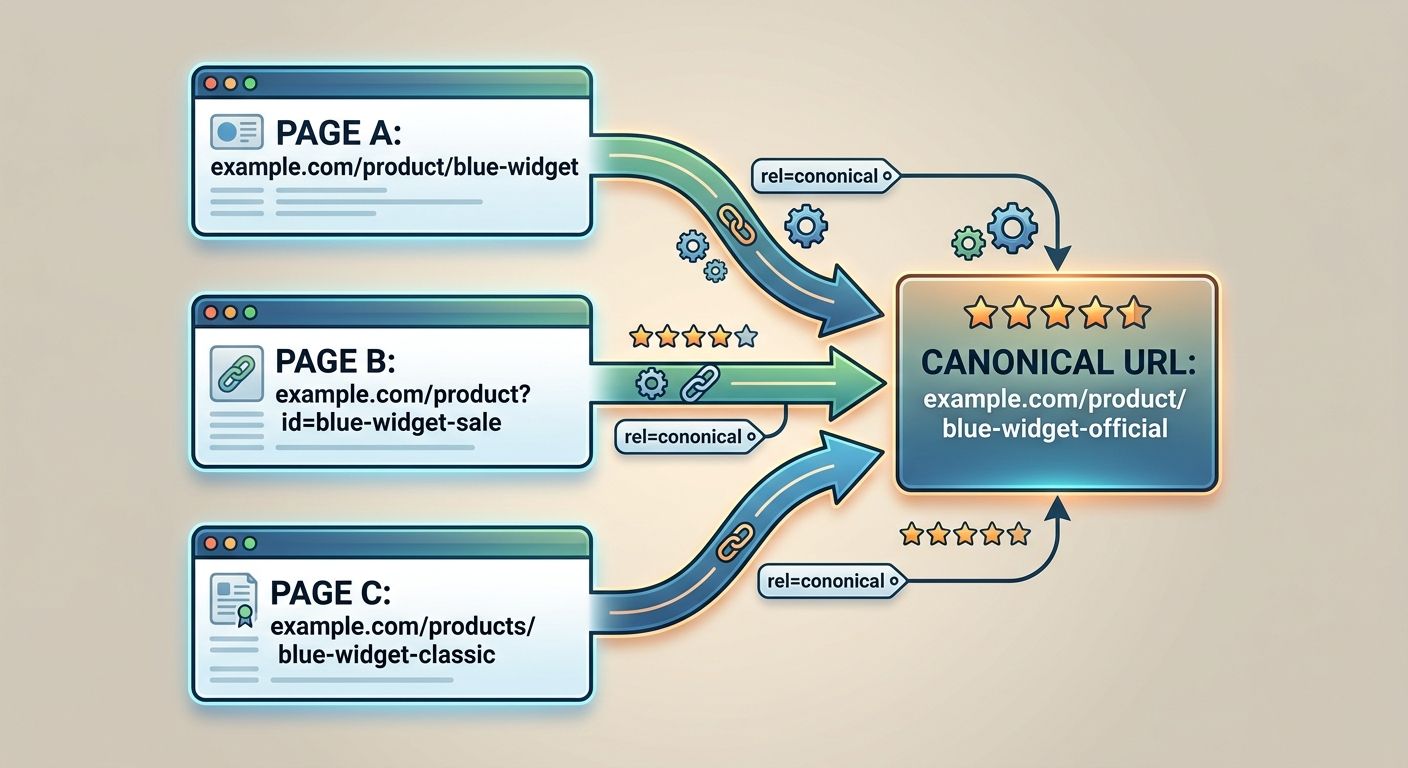
This happens more often than people realize. A product page accessible at /shoes/red-sneakers/, /shoes/?color=red&type=sneakers, and /sale/red-sneakers/ creates three URLs for one page. Google has to decide which one to index.
The rel="canonical" tag tells Google which version is the authoritative one. You add a <link rel="canonical"> element to the <head> of each duplicate page, pointing to the canonical version. Google then consolidates ranking signals to that single URL.
A common mistake is using canonical tags and redirects together on the same URL pair. Pick one approach. If the duplicate URL should never be visited by users, redirect it. If both URLs need to remain accessible for usability or technical reasons, use a canonical tag. Applying both sends conflicting signals that leave Google guessing which instruction to follow.
Where the Model Breaks
The URL structure mechanism works well on standard content sites. Blogs, service pages, informational content, small-to-medium e-commerce stores with stable product catalogs. For these sites, clean SEO URLs with hyphens, shallow folder structures, proper redirects, and canonical tags cover nearly every situation you'll encounter.
The model starts to crack in specific scenarios.
Single-page applications (SPAs) that render content client-side sometimes produce URLs that search engines can't parse correctly. The content exists in JavaScript, and the URL may be a hash fragment (/#/products/shoes) that Googlebot doesn't follow reliably. Server-side rendering or pre-rendering solves this, but the url structure alone can't fix a rendering problem.
Massive dynamic sites with millions of pages generated from database queries (think travel aggregators, job boards, real estate listings) face a different constraint. Their URLs are often parameter-driven by necessity. The url rewriting layer translates ?listing_id=48291&city=austin into /austin/homes/48291/, but maintaining those rewrite rules at scale requires ongoing engineering attention. A single misconfigured rule can generate thousands of broken URLs overnight, and you might not notice until your organic traffic drops a week later.
Legacy sites with years of accumulated URL debt face the hardest tradeoff. You might have thousands of underscore-based URLs, each with its own backlink profile, ranking history, and internal link network. Migrating them all to hyphenated equivalents means managing thousands of 301 redirects, updating every internal link, resubmitting sitemaps, and accepting a temporary ranking dip during the transition. Sometimes the mathematically correct decision is to leave the old URLs alone and apply better structure only to new content going forward.
The broader point is that url structure is a mechanical input into a larger system. It interacts with every other on-page signal, from title tags and headings to internal links and content depth. A perfect URL on a thin page won't rank. A messy URL on an authoritative, well-linked page often will. The mechanism is real, it's measurable, and it's worth getting right. But understanding where it fits in the larger ranking picture keeps you from spending a week perfecting slugs when the content behind them still needs work.
OrganicSEO.org Editorial
Editorial team writing about Ethical, white-hat, organic SEO education.
Frequently Asked Questions
- Should I use hyphens or underscores in URLs for SEO?
- Always use hyphens, not underscores. Google's parser treats hyphens as word separators, so seo-friendly-urls registers as three distinct keywords, while seo_friendly_urls gets parsed as a single token. Hyphens also remain visible when URLs are published as bare links, whereas underscores become hidden under hyperlink underlining.
- How many folder levels should my URL structure have?
- One or two folder levels work best for most sites. A structure like /blog/seo-friendly-urls/ is preferable to deeply nested paths, as each additional folder level dilutes readability and makes crawlers work harder. The exception is large e-commerce sites, where three levels for categories like /clothing/mens/shirts/ is appropriate.
- What is the ideal slug length for SEO?
- Keep slugs between 3 and 5 words separated by hyphens, and keep the entire URL under 115 characters. URLs exceeding 115 characters correlate with lower average rankings, and overly long slugs dilute the keyword signal with filler words.
- Do I need to use 301 or 302 redirects when changing a URL?
- Use a 301 redirect for permanent URL changes—it transfers ranking power, authority, and backlinks to the new location. Use a 302 redirect only for temporary moves like A/B tests or seasonal pages, as 302s don't transfer link equity the way 301s do.
- What's the difference between canonical tags and redirects?
- Redirects handle permanent URL changes and should be used when the old URL should no longer be visited. Canonical tags handle duplicate content that exists at multiple URLs simultaneously and should be used when both URLs need to remain accessible. Never use both on the same URL pair, as they send conflicting signals.
- Why should I use lowercase in URLs?
- Mixed-case URLs like /SEO-Guide/ vs /seo-guide/ can create duplicate content issues on case-sensitive servers. Set a site-wide rule to always use lowercase and enforce it consistently.
- How long should I monitor after changing a URL with a redirect?
- Monitor Google Search Console for 4 to 8 weeks after any URL change to catch indexing issues. Also update your internal links to point directly to the new URL instead of relying on redirects, and resubmit your XML sitemap.