Tracking SEO Performance: KPIs, Attribution, and What to Actually Measure
One site's Search Console performance report showed impressions climbing 27.56% year-over-year while clicks fell 36.18%, and CTR dropped from 5.98% to 3.35%—all while average rankings improved by 14.01%.
Tracking SEO Performance: KPIs, Attribution, and What to Actually Measure
One site's Search Console performance report showed impressions climbing 27.56% year-over-year while clicks fell 36.18%, and CTR dropped from 5.98% to 3.35%—all while average rankings improved by 14.01%. That single dataset, documented by Dataslayer, captures the core dysfunction in SEO measurement right now: the metrics that used to move together have decoupled, and the reports most teams still rely on tell a story that doesn't match reality.
The reason this matters is structural. Google's AI Overviews now appear for roughly 13% of queries, and when they do, CTR drops by about 47%. HubSpot lost 70–80% of its organic traffic in that analysis; CNN dropped 27–38%. If you're still reporting "organic sessions" as your north star SEO KPI, you're measuring a number being eroded by forces completely outside your control, and you won't see the erosion coming until revenue dips months later.
So what should you actually track? And how do you assemble a reporting stack that connects SEO work to business outcomes? That's what this piece covers, from the individual metrics worth watching down to the attribution plumbing that makes them meaningful.
The KPIs That Still Correlate with Revenue
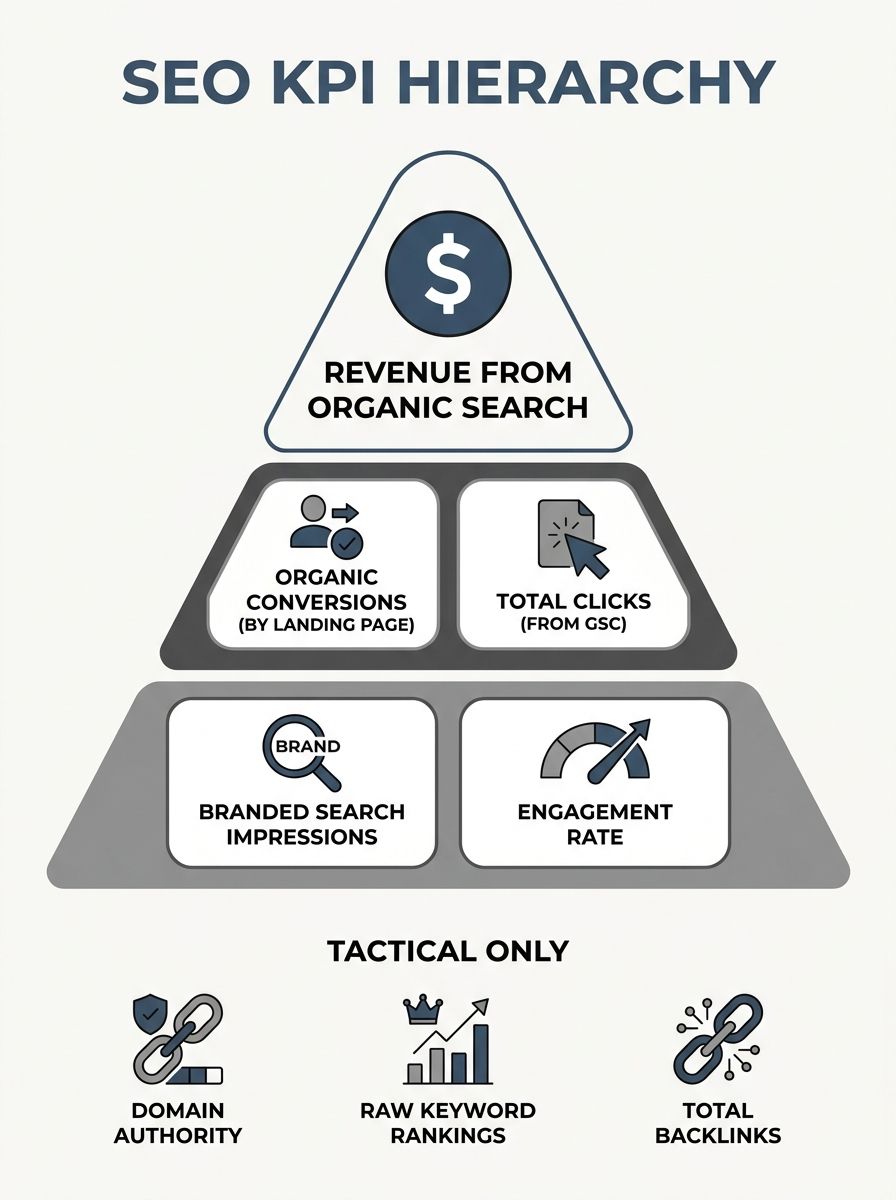
Tracking SEO performance starts with choosing the right indicators. A lot of the standard lists you'll find online include 12 or 17 metrics, most of which are vanity numbers dressed up with dashboard widgets. You can safely ignore domain authority, total backlink count, and raw keyword rankings as strategic KPIs. They're useful for tactical work—diagnosing why a specific page underperforms, for example—but they shouldn't appear in a monthly executive report.
Here are the metrics that actually tell you whether SEO is contributing to the business:
Revenue from organic search. This is the only number that matters at the top of the reporting hierarchy. Track it through conversion goals or e-commerce tracking in GA4. The formula for SEO ROI measurement is straightforward: [(Revenue from Organic Search - Total SEO Costs) / Total SEO Costs] × 100, as outlined in Oscar Carreras's ROI guide.
Organic conversions by landing page. Revenue is the aggregate, but you need to know which pages generate that revenue. This is where you connect effort to outcome. A page you spent three months optimizing should show up here.
Total clicks from Search Console. Brian Dean at Backlinko has called this the "north star" metric, and there's a logic to it. If clicks are rising, organic search is sending more people to your site. If clicks are flat while impressions grow, something (often AI Overviews) is eating the click.
Branded search impressions. Sites with growing branded search volume saw 2.75x higher organic revenue growth in recent analyses. Branded search is a proxy for awareness, and it's a signal that feeds AI citation models too.
Engagement rate and pages per session for organic visitors. GA4's engagement rate replaced bounce rate, and it's a better metric. An engaged session means the user stayed 10+ seconds, viewed 2+ pages, or triggered a conversion event.
Notice what's absent from this list: average position and total impressions as standalone KPIs. Total impressions in the Search Console performance report tells you how often your pages appeared in SERPs, but as Semrush notes, it doesn't indicate clicks. With AI Overviews absorbing clicks at the top of the funnel, a page can gain impressions all year and deliver less traffic each month.
Connecting GA4 and Search Console Data
GA4 SEO tracking is incomplete without Search Console data flowing into it. GA4 knows what users do on your site. Search Console knows what queries brought them there. Separately, each tool gives you half the picture. Together, they let you answer the question every SEO needs answered: which queries produce revenue?
The integration itself is simple. In GA4, go to Admin → Product Links → Search Console Links and connect your verified property. Google has documentation for the setup. Once linked, you get two new reports in GA4 under Acquisition: "Google organic search queries" and "Google organic search traffic." The first shows queries with clicks, impressions, and CTR. The second shows landing pages with the same data.
But here's where most teams stop, and it's too early. The real value comes from combining these datasets at the query level with your conversion data. When Universal Analytics died, it took the keyword-level revenue report with it. GA4 replaced it with "(not provided)" for most organic keyword data, and as Suganthan Mohanadasan documented, teams have been patching together answers with "spreadsheets, gut feelings, and increasingly creative lies in client reports" ever since.
The workaround that works: export both GA4 and GSC data into BigQuery, then join on landing page URL and date. This gives you the ability to see which search queries drove sessions that eventually converted. It's imperfect because the join is page-level, not session-level, but it's the closest thing we have to keyword-level revenue tracking. If you're evaluating which SEO tools earn their subscription, BigQuery access is the feature that separates serious analytics from dashboards that look pretty.

Why Your Attribution Model Changes Everything
Attribution models determine which touchpoints get credit for a conversion. And the model you choose will dramatically change how SEO ROI shows up in your reports. This isn't a theoretical concern. A user might discover your site through an organic search, return through a paid ad, and convert after clicking an email link. Under last-click attribution, SEO gets zero credit. Under first-click, SEO gets all of it. Under data-driven attribution (GA4's default), the credit is distributed algorithmically.
As Hashmeta's attribution guide explains, attribution models fundamentally transform how businesses understand SEO's contribution. If you've ever seen SEO ROI numbers swing wildly between reports, the attribution model is usually the reason.
The practical recommendation: use GA4's data-driven attribution as your baseline, but always check assisted conversions. The Advertising → Attribution → Conversion Paths report in GA4 shows you how often organic search appears earlier in the conversion path, even when it doesn't get last-click credit. For most content-heavy sites, organic search introduces more users than it closes, which means last-click reporting chronically undervalues SEO.
If you're doing keyword research to target top-of-funnel informational queries, those pages will almost never convert on first visit. They'll show up as assisted conversions. If your reporting doesn't account for this, your keyword strategy will look like a money pit when it's actually filling the top of your pipeline.
Accounting for AI Overviews Lost Clicks
The AI Overviews lost clicks problem requires its own measurement approach because it creates a new category of invisible impact. Your content might be fueling an AI-generated answer, driving awareness and shaping purchasing decisions, without generating a single click to your site.
There's no perfect solution yet, but you can approximate the impact:
Segment your Search Console data by query type. Informational queries (how-to, what-is, definition-style) are the most affected by AI Overviews. Compare CTR trends for these queries against navigational and transactional queries. If informational CTR is declining while others hold steady, you've quantified the AI Overview effect for your site.
Monitor branded search volume as a downstream signal. If your content is cited in AI Overviews, some fraction of users will search for your brand directly afterward. A rising branded query volume alongside falling informational click volume is a healthy signal, even though it doesn't show up in traditional organic traffic reports.
Track AI referral traffic separately. Traffic from ChatGPT, Perplexity, Gemini, and Copilot should be identifiable in GA4 through source/medium parameters. Create a custom channel group for AI referral traffic and monitor it monthly. This traffic tends to be high-intent and converts well.
Build an AI visibility tracking panel. Pick 50–100 queries central to your business. Test them weekly across the major AI platforms. Record whether your brand is mentioned, whether your URL is cited, and what the recommendation context looks like. This is manual work. Tools like Semrush and Peec AI are starting to automate it, but manual tracking gives you qualitative insight that automated tools miss.
The important thing is to track these metrics alongside your traditional SEO KPIs, not in place of them. You need a dashboard that shows organic clicks, AI referral traffic, and branded search volume on the same page so you can see the full picture of how search visibility translates into business contact.

Calculating ROI Without Spreadsheet Fiction
SEO ROI measurement breaks down when you can't agree on what counts as cost and what counts as revenue. The formula itself is simple: (Organic Revenue - SEO Costs) / SEO Costs × 100. The hard part is the inputs.
For costs, include everything: agency or in-house team salaries allocated to SEO, tool subscriptions, content production costs, link-building expenses, and technical development time. Most teams undercount costs because they don't include the developer hours spent on on-page optimization work or site speed improvements.
For revenue, use GA4 conversion tracking with data-driven attribution. If you're an e-commerce site, this is relatively clean because you have transaction values. If you're a B2B company with a long sales cycle, you'll need to assign a dollar value to lead form submissions based on your average close rate and deal size. A lead worth $500 in expected value is better than no number at all, even if it's imprecise.
The timeline matters too. SEO investments compound. A page published today might not rank for six months. This means monthly ROI calculations will always look worse than quarterly or annual ones. Report monthly metrics for tracking progress, but calculate ROI on a rolling 12-month basis. Anything shorter rewards short-term tactics and penalizes the content and link-building work that actually drives durable results.
One common trap: don't include rankings improvement as a revenue proxy. Rankings are an intermediate metric. They can go up while traffic goes down (as the dataset at the top of this article showed). Tie your ROI calculation to actual conversions.
The Parts That Aren't Settled Yet
Several pieces of the SEO measurement puzzle remain genuinely unsolved, and anyone claiming they have a complete framework is overselling.
AI citation attribution has no standard. When ChatGPT summarizes your content and the user buys your product after reading that summary, there's no reliable way to trace that conversion back to the AI interaction. Branded search volume is the best proxy we have, but it's noisy and influenced by many factors beyond AI citations.
Cross-device and cross-platform tracking keeps getting harder. Privacy regulations and browser restrictions on third-party cookies mean GA4's user stitching is less reliable than Universal Analytics was. If your audience moves between mobile search, desktop research, and in-app AI assistants, significant portions of their path will be invisible to your analytics.
The "zero-click" value problem has no agreed-upon metric. If someone reads your featured snippet and gets the answer they need without clicking, you've provided value and built brand awareness. But you can't measure it in GA4. You can see the impression in Search Console. You can't see its downstream impact. Some practitioners are experimenting with survey-based attribution (asking customers "where did you first hear about us"), but this doesn't scale well.
GA4's data model still frustrates SEOs. The shift from session-based to event-based analytics makes some comparisons harder, and the 14-month data retention limit on the free tier means historical trend analysis requires BigQuery exports or a paid GA4 360 account.
These gaps are real, and they're worth acknowledging in your reporting. A dashboard that shows what you know, what you're estimating, and what you can't measure yet is more honest and more useful than one that presents everything with false precision. The organizations adapting fastest are the ones treating SEO measurement as an evolving practice, rebuilding their tracking assumptions every quarter as the search landscape shifts underneath them.
OrganicSEO.org Editorial
Editorial team writing about Ethical, white-hat, organic SEO education.
Frequently Asked Questions
- How do AI Overviews affect SEO traffic and click-through rates?
- Google's AI Overviews appear for roughly 13% of queries and cause CTR to drop by about 47% when they do. Sites like HubSpot lost 70–80% of organic traffic and CNN dropped 27–38%, because users get answers directly from AI summaries without clicking through to websites.
- What are the best KPIs to track for SEO performance?
- The most important SEO KPIs are: revenue from organic search, organic conversions by landing page, total clicks from Search Console, branded search impressions, and engagement rate/pages per session for organic visitors. Avoid vanity metrics like domain authority, total backlinks, and average position as strategic KPIs.
- How do you calculate SEO ROI?
- SEO ROI is calculated as: [(Revenue from Organic Search - Total SEO Costs) / Total SEO Costs] × 100. Include all costs (salaries, tools, content production, development time) and measure revenue through GA4 conversion tracking with data-driven attribution, calculated on a rolling 12-month basis rather than monthly.
- How should I connect Google Search Console and GA4 for better SEO tracking?
- Link Search Console to GA4 in Admin → Product Links → Search Console Links. This creates two new reports under Acquisition showing organic search queries and traffic. For deeper analysis, export both GA4 and GSC data to BigQuery and join on landing page URL and date to track which queries drove conversions.
- Why does attribution model choice matter for SEO reporting?
- Attribution models determine which touchpoints get credit for conversions, dramatically changing SEO ROI numbers. Under last-click attribution, SEO often gets zero credit even when it introduced the user early in the journey. GA4's data-driven attribution and assisted conversions reports better show SEO's true contribution, especially for top-of-funnel content.
- How can I measure the impact of AI Overviews on my SEO?
- Segment Search Console data by query type and compare CTR trends for informational queries against navigational ones. Monitor branded search volume as a downstream signal, track AI referral traffic separately in GA4, and manually test 50–100 key queries weekly across AI platforms to see if your brand is cited.
- What should I include in SEO costs when calculating ROI?
- Include all expenses: in-house team salaries allocated to SEO, agency fees, tool subscriptions, content production costs, link-building expenses, and technical development time such as developer hours spent on page optimization and site speed improvements.